

Term Management Tools
Table of Contents
Description
Managing WordPress taxonomies, such as categories, tags, and custom taxonomies, can become overwhelming, especially on large websites. Term Management Tools is a powerful WordPress plugin designed to streamline taxonomy management by allowing users to merge, set parent terms, and change taxonomies effortlessly.
Whether you’re running a blog, WooCommerce store, or a membership site, this plugin simplifies taxonomy organization, improving site structure and SEO. With its bulk actions feature, managing taxonomies becomes quick and efficient.
Components
Term Management Tools includes essential features that make handling taxonomies easier:
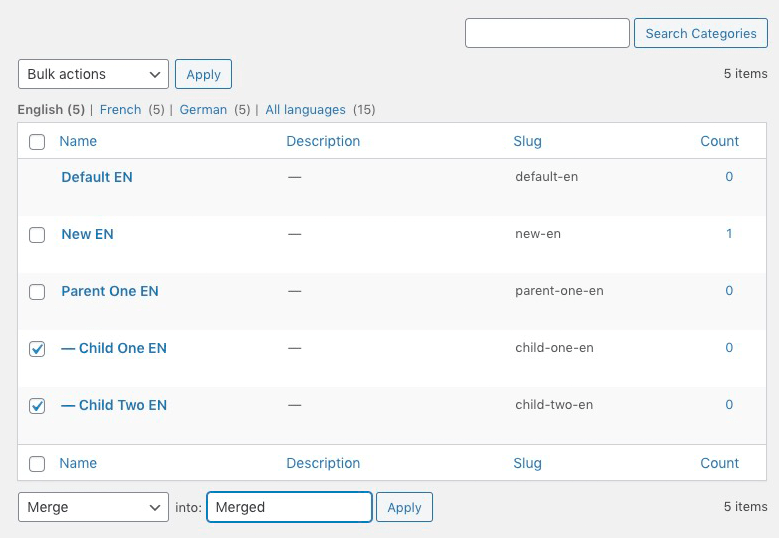
- Merge Terms – Combine multiple categories or tags into a single term.
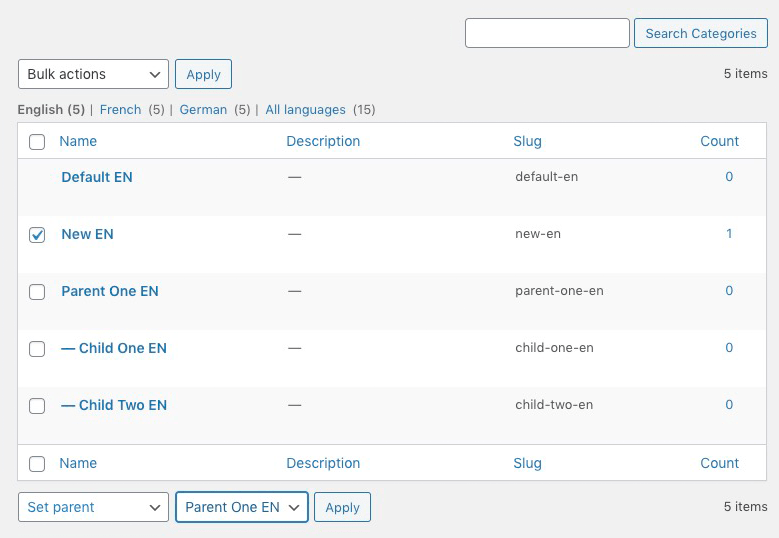
- Set Parent Term – Assign a parent to multiple terms in hierarchical taxonomies.
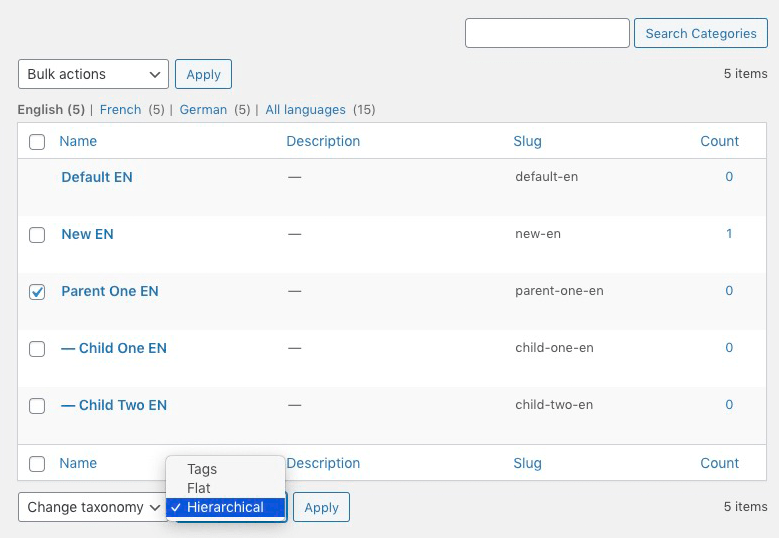
- Change Taxonomy – Move terms between different taxonomies (e.g., from tags to categories).
- Bulk Actions Integration – Access features directly from the WordPress taxonomy management screen.
- Compatible with Custom Taxonomies – Works with custom taxonomies created by plugins like WooCommerce, LearnDash, and more.
Use Cases
1. Bloggers & Content Creators
Over time, blogs accumulate duplicate tags and categories, which can affect SEO and usability. Term Management Tools helps in merging similar terms, ensuring a cleaner taxonomy.
2. WooCommerce Stores
E-commerce sites with hundreds of product categories and tags can use this plugin to organize product taxonomy efficiently, improving navigation and searchability.
3. LMS & Membership Sites
Learning management systems (LMS) and membership sites using plugins like LearnDash or BuddyPress can manage course categories and member groups more effectively.
4. Multisite Networks
Websites with multiple blogs or stores under a WordPress Multisite setup can use this plugin to standardize taxonomy across the network.
Multisite Support
✅ Fully compatible with WordPress Multisite
✅ Bulk taxonomy actions work across networked sites
✅ Improves site-wide organization for multisite installations
Network administrators can apply changes to all sites in a multisite network, ensuring consistent taxonomies for better content structure and SEO.
Free vs Premium Plugin
Comparison with Similar Plugins
How does Term Management Tools compare with other WordPress taxonomy management plugins?
| Feature | Term Management Tools | WP Sheet Editor | TaxoPress | Simple Tags |
|---|---|---|---|---|
| Merge Terms | ✅ | ✅ | ❌ | ❌ |
| Set Parent Terms | ✅ | ✅ | ✅ | ❌ |
| Change Taxonomies | ✅ | ✅ | ✅ | ❌ |
| Bulk Actions Integration | ✅ | ✅ | ❌ | ❌ |
| Custom Taxonomy Support | ✅ | ✅ | ✅ | ✅ |
| Automatic Tag Suggestions | ❌ | ❌ | ❌ | ✅ |
Verdict: Term Management Tools is the best free solution for basic taxonomy editing. If you need advanced automation or tag suggestions, alternatives like TaxoPress or WP Sheet Editor might be better.
Frequently Asked Questions
1. Is Term Management Tools free?
Yes, Term Management Tools is 100% free and available in the WordPress plugin repository.
2. Can I merge multiple categories into one?
Yes, you can select multiple categories or tags and merge them into a single term using the Bulk Actions menu.
3. Does this plugin work with custom taxonomies?
Yes! Term Management Tools supports custom taxonomies created by plugins like WooCommerce, LearnDash, and Membership plugins.
4. Is it compatible with WordPress Multisite?
Yes, Term Management Tools works with Multisite, allowing network-wide taxonomy management.
5. Can I convert tags into categories?
Yes! The Change Taxonomy feature lets you move terms between categories, tags, and custom taxonomies.
6. Will this plugin affect my SEO?
No, merging and reorganizing terms does not harm SEO as long as redirects are properly handled using an SEO plugin like Rank Math or Yoast SEO.
7. How do I install Term Management Tools?
Go to Plugins > Add New, search for Term Management Tools, and click Install and Activate.
8. Can I undo a merge or taxonomy change?
No, changes made using Term Management Tools cannot be undone, so backup your database before making changes.
Conclusion
Term Management Tools is a must-have plugin for WordPress users who need to manage categories, tags, and taxonomies efficiently. With bulk merge, taxonomy conversion, and hierarchical structuring, this plugin helps organize content, improve SEO, and streamline taxonomy management.
For basic taxonomy organization, the free version is enough. However, if you need advanced filtering, automation, or WooCommerce support, you may want to explore premium alternatives.
🚀 Ready to simplify your WordPress taxonomy management? Install Term Management Tools today and take control of your site’s organization!
Photos: Term Management Tools


There are no reviews yet.